
More details and step-by-step guides are in the Voicemeeter documentation below.
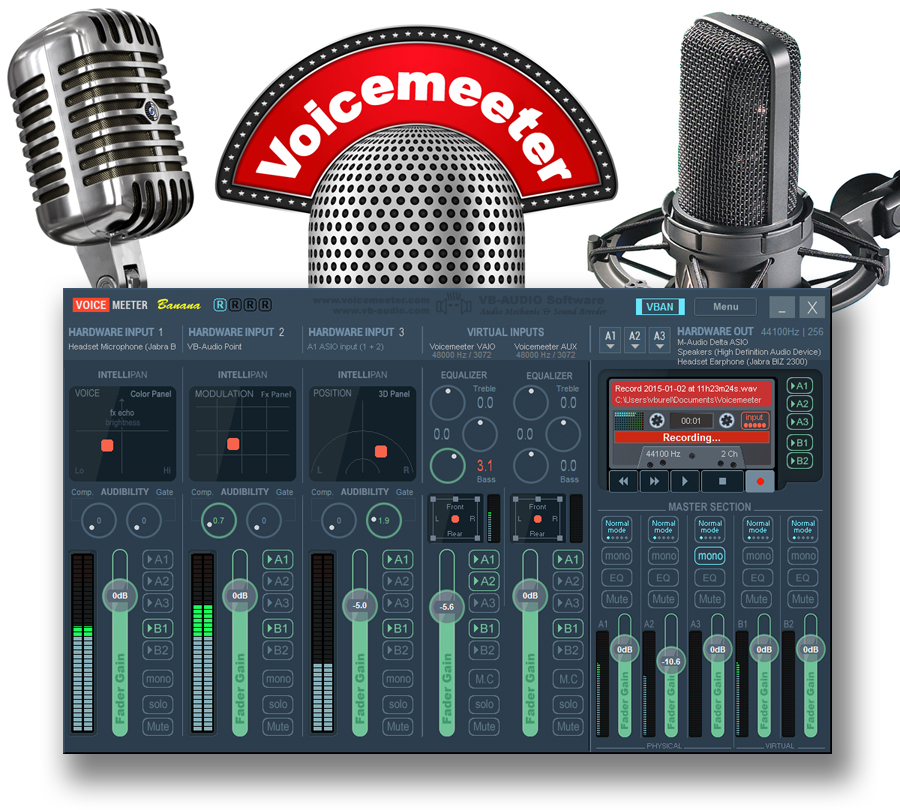
VOICEMEETER BANANA Advanced Mixer.
Voicemeeter Banana (often searched as "Voice Banana" or "Banana Voicemeeter") is the advanced Windows mixer from VB Audio. Its built-in virtual audio devices act as extra inputs and outputs, so you can blend, route and fine-tune every voice, microphone or app sound between your hardware and your software (3x physical I/O plus 2x virtual I/O).
Running it for the first time? Follow the manual one step at a time, starting with step ZERO of the documentation – it saves a lot of setup headaches.
Voicemeeter 2.1.3.0 (ZIP Package)
Standalone application + virtual audio device · MME, DX, KS, WDM, ASIO
Voicemeeter DownloadVoicemeeterSetup_v2130.zip · 42.6 MBINSTALLATION: launch the setup with administrator rights, then restart your PC – both after installing and after removing it. This single Voicemeeter download contains two programs: the classic Voice Meeter and Voicemeeter Banana.
Check out our new Voicemeeter User Guides.
Donationware License!
Voicemeeter Banana costs nothing to use and every core function is unlocked (only optional extras are excluded). Found it useful? Contribute any amount, at any time you like – every bit of support is appreciated!
Install it & Test it first!
Once 30 days have passed, the About box of Voicemeeter Banana will suggest getting a license – or you can simply keep evaluating. Press BUY ONLINE whenever you are ready to grab a license from the webshop.
The program runs fully offline and gathers no personal data at all. COO (Country Of Origin): France.
More about our licensing here.
In the Spotlight:
Fresh videos and articles about Voicemeeter from the community. A big thank-you to everyone who shares reviews, guides and setups – let us know when you publish something new!


Voicemeeter Banana – The Advanced Virtual Audio Device Mixer for Windows!
The Advanced Virtual Audio Mixer
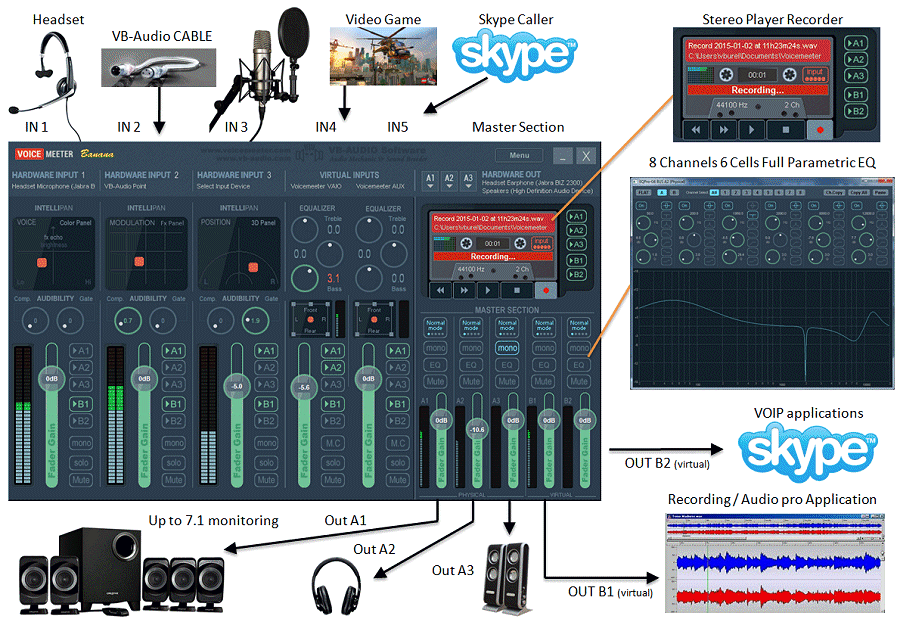
Voicemeeter rethinks audio management on Windows. Any sound source can be wired to any audio program in a few clicks, and you stay in full control of quality the whole time. Hook up DVD players, USB microphones, ASIO interfaces, games, iTunes or a professional DAW – Voicemeeter ties them together and opens up entirely new ways to work with sound.
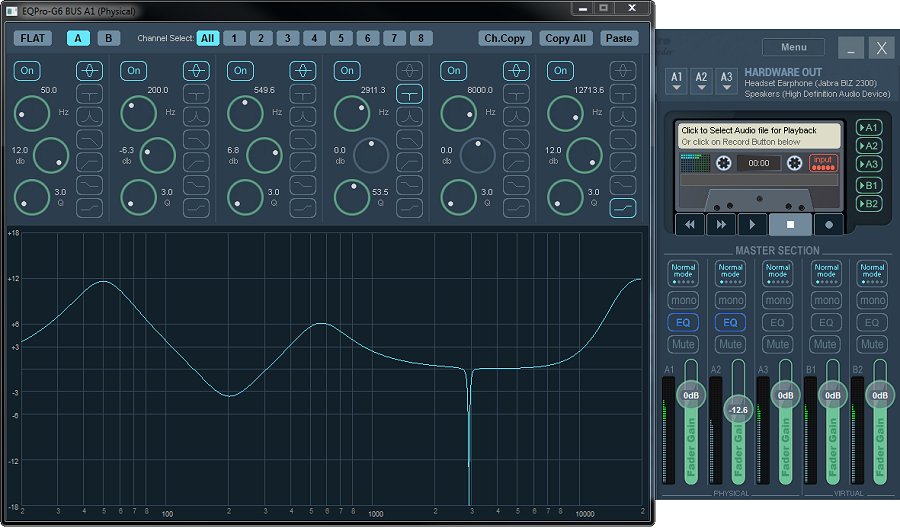
Parametric EQ and Audio Recorder
Every bus gets a full parametric EQ with 8 channels and 6 cells – perfect for tuning 5.1 or 7.1 speaker setups, or for using the multi-channel EQ as a crossover for 2-, 3- or 4-way stereo P.A. rigs. The built-in Tape Deck captures or plays back any source or audio file with a single click (WAV, AIFF, BWF, MP3 + MP4, M4A, MOV, AVI, WMA, WMV...).
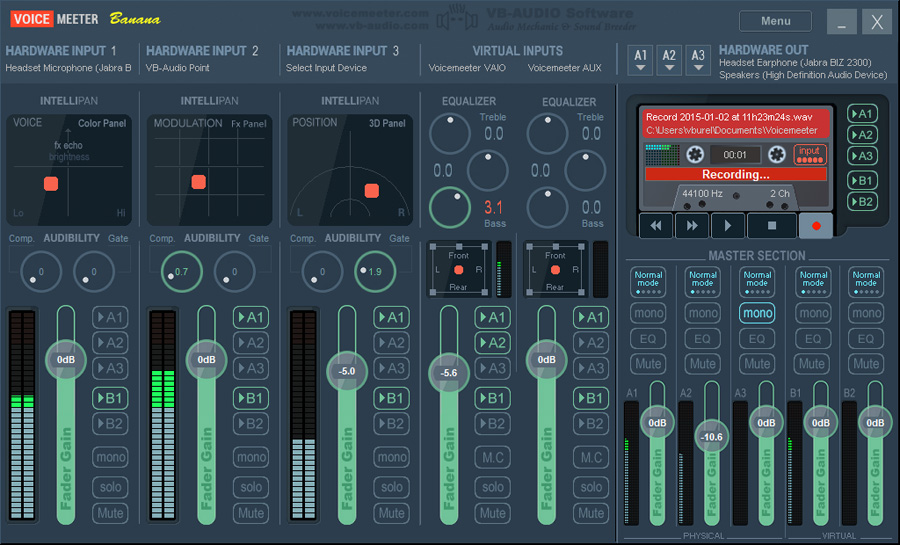
Universal Virtual Audio Device to connect everything together
Voicemeeter Virtual I/O
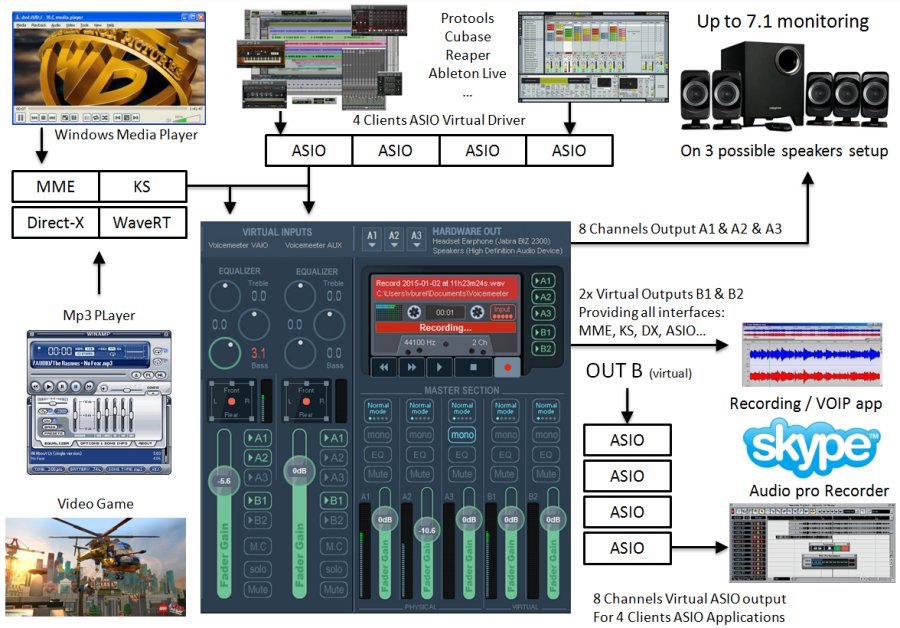
All Audio Interfaces Support: MME, Direct-X, KS, WaveRT, WASAPI, and ASIO
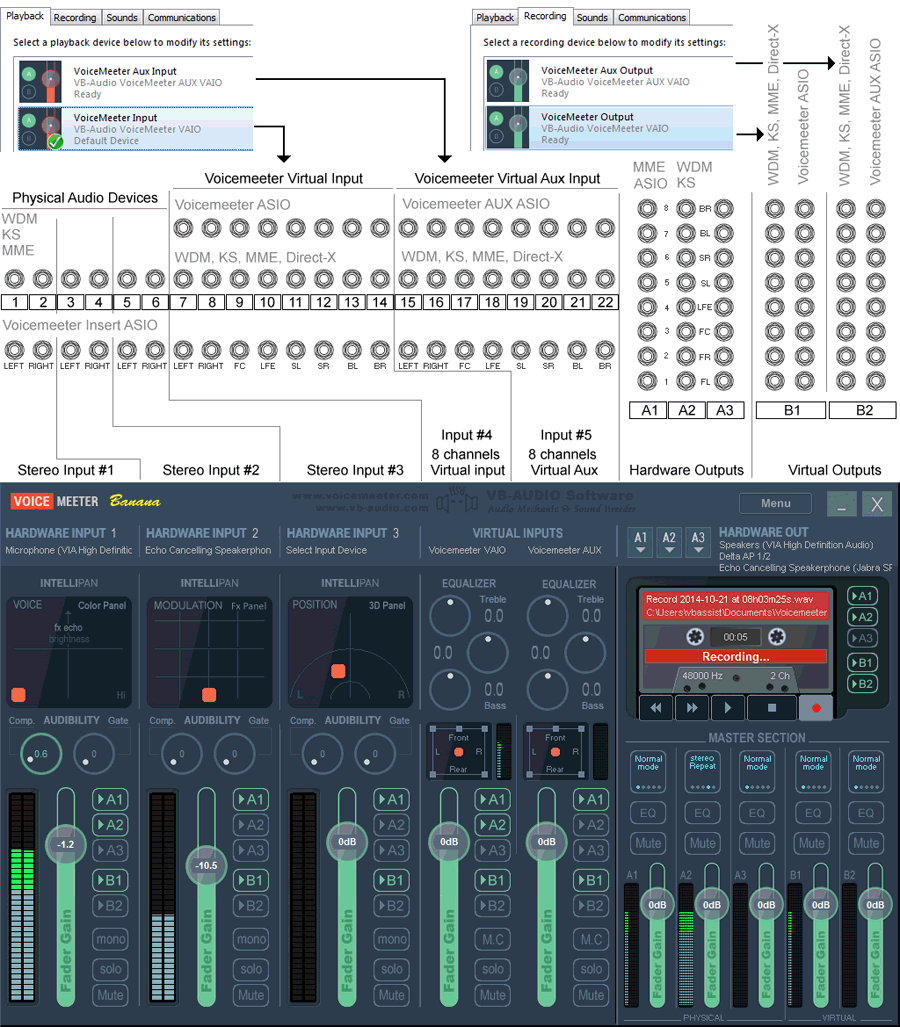
SPECIFICATIONS
| Device Type | PC-Core Virtual Audio Mixing Console |
|---|---|
| Compatibility | Windows XP, VISTA, WIN7, WIN8, WIN8.1, WIN10 (32 / 64 bits) |
| PC Configuration | Min: Celeron / Duo Core 1.8 GHz – 512 MB RAM – Disk < 100 MB |
| Number of Audio Device I/O | 5 Inputs (3 physical / 2 virtual). 5 Outputs (3 physical / 2 virtual) |
| BUS / Layer | 5x BUS (A1, A2, A3 and B1, B2) / Single Layer |
| Audio Engine Capabilities | 32, 44.1, 48, 88.2, 96, 176.4 or 192 kHz DSP Processing (defined by Output A1 configuration) |
| Output A1 (Main) | WDM, KS, MME, ASIO (32 kHz to 192 kHz) – 1 to 8 channels |
| Output A2 | WDM, KS, MME (8 kHz to 192 kHz) – 1 to 8 channels |
| Output A3 | WDM, KS, MME (8 kHz to 192 kHz) – 1 to 8 channels |
| 3x Physical Inputs | WDM, KS, MME (8 kHz to 192 kHz) – mono or stereo. |
| 2x Virtual I/O | WDM, KS, MME, DirectX, WaveRT (8 kHz to 192 kHz) 1 to 8 channels 8 channels on virtual input, 2 on virtual outputs. |
| 2x Virtual ASIO I/O | ASIO (32 kHz to 192 kHz) 8 Channels (in and out) / 4x Client Applications. Virtual ASIO configuration is given by Main Output A1 (SR and Buffering) |
| 1x Virtual Insert ASIO I/O | ASIO (32 kHz to 192 kHz) 22 Channels (in and out) / Single Client Application. Virtual ASIO configuration is given by Main Output A1 (SR and Buffering) |
| M.I.D.I. Implementation (remoting) | Gain faders, Mute, Solo, M.C. (Configuration by Learn process). |
| Strip Processing | - "Color Panel" Control (Equalization). - "Modulation" Control (Chorus). - 3D Panoramic Control (source positioning by binaural effect). - Audibility Knob Compressor. - Audibility Knob Gate effect. - 3 Bands Graphic Equalizer (on Virtual Input). - Strip Limiter (-40dB to +12dB). - Mute / Solo. |
| BUS Processing | - Integrated Limiter and Peak Remover. - Mix Down to convert 5.1 or 7.1 to Stereo. - Stereo Repeat (Stereo signal copied on channel 3,4 / 5,6 / 7,8) - Master Full Parametric EQ (6 Cells / 8 channels + Gain/Delay per channel). - Mute / Mono |
| VBAN Implementation | - 8x Audio Input streams (up to 8 channels). - 1x VBAN-MIDI Input stream. - 1x VBAN-TEXT Input stream. - 8x Audio Output streams (up to 8 channels). - 1x VBAN-MIDI Output stream. - 1x VBAN-FRAME Output stream (VIDEO). |
| Others | - Physical Output Synchronization Delay in system settings dialog box. - Internal Clock (to run without physical audio device). - Screen Sharing / Screen Mirroring functions through VBAN-FRAME protocol |
Documentation
Get the Voicemeeter Banana User Manual.
Never used Voicemeeter before? Read the Voicemeeter User Manual first – it explains the essentials.
Video & Tutorials
Tutorials and setups recorded by Voicemeeter users – thanks to all creators!


